Lord Spacington the Third, Devourer of Tabs
When I develop new features, I keep forgetting to clean up my code. I'll try out a new workflow or editor, and forget to include all the linters and formatters. Here's how we automatically correct stupid mistakes in CI, even after they've slipped through the cracks on my machine.
Focus on what you can control, never bother with the rest.
 Lord Spacington will happily devour your tabs. Lest we forget.
Source Control
Source control management makes our lives easier, prevents errors, and help us recover from them. Git stores source code. Registries store artifacts. That's the clean model.
But the real world is messier:
Generated code is source code. Some pipelines bypass artifact registries entirely. And sometimes a developer forgets to regenerate after a generator upgrade, or pushes tabs where spaces should go, or edits a file without having the linter running. These are not logic errors. They are deterministic, mechanical problems with deterministic, mechanical solutions.
Accidents Happen
I try to set up with automatic tools wherever it's practical. Auto-format on save. Pre-commit hooks can be practical if they run quick enough. In practice, some errors still tend to seep through the cracks.
Latin proverb
Errare humanum est … perseverare autem diabolicum.
To err is human, but to persist in the error is diabolical.
Making mistakes is a normal part of being human, but stubbornly repeating or refusing to correct those mistakes is foolish and destructive.
The code will have stupid mistakes. Even I will at some point forget to build or lint. And so will you. Now let's fix the errors.
The Maturity Model
When it comes to generated artifacts and automated fixes, I have seen teams and projects evolve through four levels of maturity:
graph LR
    L1["1. Ignore"] --> L2["2. Detect"]
    L2 --> L3["3. Fix"]
    L3 --> L4["4. Omit"]
style L3 fill:#2ecc71,stroke:#27ae60,color:#000- Ignore. There is drift between the checked-in artifact and the source of truth. You notice it eventually and fix it manually. You are a leaf on the wind ⧉.
- Detect. The CI pipeline fails when there is a diff between what's checked in and what should be there. The developer is on the hook to fix it before you can merge.
- Fix. The CI pipeline detects the diff, runs the fix, and commits the result. The developer never has to stop in their tracks.
- Omit. Artifacts are never checked in at all. CI builds them and publishes them to a registry or deployment target. This is the ideal, but not always practical. Go's ecosystem, for instance, makes this hard because packages are fetched from version control directly.
For several use cases, level 3 is the sweet spot for our team today.
Note
Level 4 applies to generated artifacts only. Fixes, formatting, and linting stop at level 3 — there is no registry to publish them to.
Meet Lord Spacington
Lord Spacington the Third, Devourer of Tabs, is a CI automation pattern that commits deterministic, autofixable repository maintenance back to our PR branches.
Once you have run your automation/generation/auto-fixes, Lord Spacington's role is to commit the result. He uses a clear identity with his own persona, largely consisting of the distinguishable name and email address in his git user. If you'd like, you can sprinkle top hat emojis to taste.
The workflow is simple:
graph TD
    A["Run fix / format / generate"] --> B{"Working tree dirty?"}
    B -- No --> C["Nothing to do"]
    B -- Yes --> D["Commit as Lord Spacington the Third"]
    D --> E["Best-effort concurrency guard: Rebase on top of the latest PR head"]
    E -- Success --> F["Push to PR branch"]
    E -- Failure --> G["Lord Spacington will retry at the next commit."]
After the fixes have been applied by this workflow, the PR will pass tests. Nobody has to manually format anything. The developer moves on to things that actually require human judgment.
Real-World Implementations
Lord Spacington is saving us tedious button-clicking right now in several of our repositories:
- We run
prettierfor Markdown and TypeScript formatting. - We run
eslintfor linting our TypeScript. - We run
tofu fmtfor Terraform/OpenTofu formatting. - We run
go fixfor code modernization in Go. - We even run
npm run buildin some repos that bypass artifact registries in CD.
npx prettier --write .
Markdown and TypeScript formatting.
npx eslint --fix .
TypeScript linting.
tofu fmt -recursive
Terraform/OpenTofu formatting.
go fix ./...
Code modernization.
npm run build
Generated artifacts for repos that bypass artifact registries in CD.
Before and After
Before his Lordship arrived to grace us with his relentless fixing of minute details, fixing these issues required manual grunt work. We were stuck on level two, with required status checks asserting that the repo is in order ⧉ at the head of each PR branch.
But whenever tests failed, a developer had to notice that the PR was in the red and pay attention to it. Pull down the latest commit, run the formatter locally, commit the changes, and push. Our developers turned into human middleware, having been told exactly what to do, then using our brittle minds to follow the recipe to fix it, cumulatively spending hours.
With Lord Spacington, our workflows help us with getting the PR to a passing state. No human attention needed.
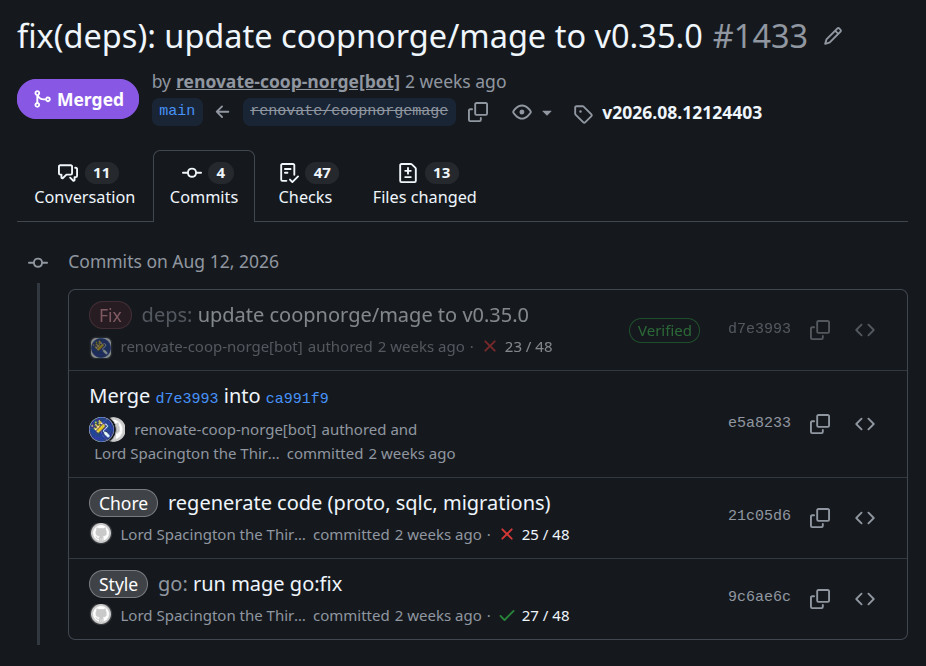 Lord Spacington ran code generation after a generator update, and auto-fixed
some issues after our mage target had introduced a new linter.
Lord Spacington ran code generation after a generator update, and auto-fixed
some issues after our mage target had introduced a new linter.
The Concurrency Problem
What if two workflows are auto-fixing your PR at the same time? Multiple workflows pushing commits to the same branch can collide.
Lord Spacington's answer is conservative: before pushing, rebase against the head of the PR. If the rebase succeeds, push. If it fails, just accept the failure and move on. The automation will get another chance when the workflow runs on the latest commit.
This is only a theoretical concern. In practice, it works. The automation solves far more problems than it creates.
What if an auto-fix collides with your own changes? First, you can pull with rebase locally. If you get conflicts, you can resolve them however you like. You can integrate them, of course, but you can also simply drop the commit. His Lordship doesn't care if you discard his work. He's a bot.
Conflicts are rare
These conflicts actually being an issue is going to be rare. Remember: Lord Spacington's commits are solely deterministic outcomes. They are direct consequences of the contents of the previous commit.
The Philosophy
Focus on what you can control, never bother with the rest.
There are things worth being bothered by: source code, design decisions, logic, trade-offs that require human judgment.
There are things not worth being bothered by: linting, formatting, tabs and semicolons, generated artifacts, deterministic modernization that a machine can do in seconds.
Implementing Lord Spacington in Your Repository
There are two pieces: a reusable GitHub Action that handles the commit-rebase-push cycle, and a workflow that runs the fix command and invokes the action.
The Custom Action
Create .github/actions/commit-and-push-with-spacington/action.yaml in your
repository:
name: "Commit and Push with Lord Spacington"
description: "Commits dirty working tree changes and pushes with a rebase for concurrency safety."

inputs:
  commit-message:
    description: "The commit message to use."
    required: true
  branch:
    description: "The branch to push to."
    required: true

outputs:
  changed:
    description: Whether there are changes
    value: ${{ steps.detect.outputs.changed }}
  committed:
    description: Whether changes were committed and pushed
    value: ${{ steps.commit.outputs.committed }}

runs:
  using: "composite"
  steps:
    - name: Detect changes
      id: detect
      shell: bash
      run: |
        if [[ -z $(git status --porcelain) ]]; then
          echo "changed=false" >> "$GITHUB_OUTPUT"
        else
          echo "changed=true" >> "$GITHUB_OUTPUT"
        fi

    - name: Commit and push changes
      id: commit
      if: |
        github.event_name == 'pull_request' &&
        github.event.pull_request.head.repo.full_name == github.repository &&
        steps.detect.outputs.changed == 'true'
      env:
        BRANCH: ${{ inputs.branch }}
        COMMIT_MESSAGE: ${{ inputs.commit-message }}
      run: |
        git config user.name "Lord Spacington the Third, Devourer of Tabs[bot]"
        git config user.email "spacington-the-third@your-domain.com"
        git add .
        git commit -m "$COMMIT_MESSAGE"

        git pull --rebase origin "$BRANCH" || {
          echo "::error::Failed to rebase. There may be conflicts with recent pushes."
          exit 1
        }
        git push origin "HEAD:$BRANCH"

        echo "committed=true" >> "$GITHUB_OUTPUT"
      shell: bash
The action does five things: checks if the working tree is dirty, configures a distinct git identity so the commits are easy to spot, commits all staged changes, rebases against the latest remote branch tip for concurrency safety, and pushes. If anything goes wrong, the rebase fails, or the push is rejected, the action stops cleanly.
Example Workflow: Prettier
Create .github/workflows/commit-prettier-format.yaml:
name: Commit Prettier Format

on:
  pull_request:

jobs:
  prettier:
    runs-on: ubuntu-latest
    steps:
      - uses: actions/checkout@v7.0.1

      - uses: actions/setup-node@v7.0.0
        with:
          node-version: "26"

      - run: npm ci

      - name: Run Prettier
        run: npx prettier --write .

      - uses: ./.github/actions/commit-and-push-with-spacington
        id: commit
        with:
          commit-message: "chore: auto-format with Prettier"
          branch: ${{ github.event.pull_request.head.ref }}

      - name: Fail if changes were detected
        if: steps.commit.outputs.changed == 'true'
        run: exit 1
Note
For the sake of having said it, you should add Prettier to your dev-deps
instead of using it through npx. Also, you should probably filter out the
PRs where this workflow doesn't need to run.
The workflow runs Prettier with --write, which modifies files in place. The
custom action then commits any resulting changes. The final step fails the job
if changes were made. This keeps the PR from being mergeable without the
auto-fix commit, preserving the status-check gate.
To add Lord Spacington for a different tool, swap the fix step: use
tofu fmt -recursive for Terraform, go fix ./... for Go,
npx eslint --fix . for ESLint, or npm run build for generated artifacts. The
pattern stays the same: run the deterministic command, then let the action
commit the result.
Why It Works
These workflows remove the need to cognitively and separately approve changes that belong together. I should mention that we do enforce a human to approve PRs before they end up on the main branch. Automations from Lord Spacington only ever go to the short-lived PR branch.
If we update a code generator, we should also update the generator's output. There's no need for a human to execute the generating step to achieve the output. We always want these changes to belong together, and we never want to merge them separately.
The decision to execute a new generation does not need to be a human decision. We still require a human in the loop, but to evaluate the whole set of sticky changes together as a whole.
When Not to Use
 Not every use case is a Lord Spacington use case.
Don't automate non-deterministic commits. You will loop forever, stuck in git.
Don't use this for tools that produce diffs that require genuine reviews.
The workflows will require write permissions, so it won't work in PRs from
forked repositories. There's an if test for this in the reusable action to
avoid the error, but it still won't work.
Don't automate semantic changes. AI is not there yet. Inspect those diffs.
The Bottom Line
You have better things to do than chase whitespace. So does your team.
The less a developer has to think about whitespace and semicolons, the better. Automate the deterministic. Focus your attention on the problems that actually need it.
Lord Spacington is a two-file pattern (a reusable action and a workflow) that eliminates an entire class of busywork from your PR queue.
Your formatting will be taken care of. Your generated code will be rebuilt. Your Terraform will be all shiny and pretty.
Get away from manual steps, context-switching and "LGTM, just fix the formatting" review rounds.
Don't stop at reporting mistakes as failures. Have the pipeline actually fix the issues that have known resolutions. Then you yourself can move on to the problems that actually matter.